Umujyanama Is on the App Store: A Free Farming App for iPhone in Rwanda
Hekitari's free farm adviser now installs from the App Store. Here is what it does, how to set it up on an iPhone, and what to do if you carry an Android phone.
Umujyanama, Hekitari's free, AI-powered farm advisory service for Rwanda, is now on the App Store as "Umujyanama – Hekitari". The iPhone app is free to download and free to use, carries no advertising, and needs iOS 16.4 or later. It reads your field from satellite every night, estimates the harvest, and uses AI to diagnose a sick plant from a photo and answer questions by voice in Kinyarwanda.
What can you do with the Umujyanama iPhone app?
- Find your land by its UPI, by its village, or by drawing it on the satellite picture
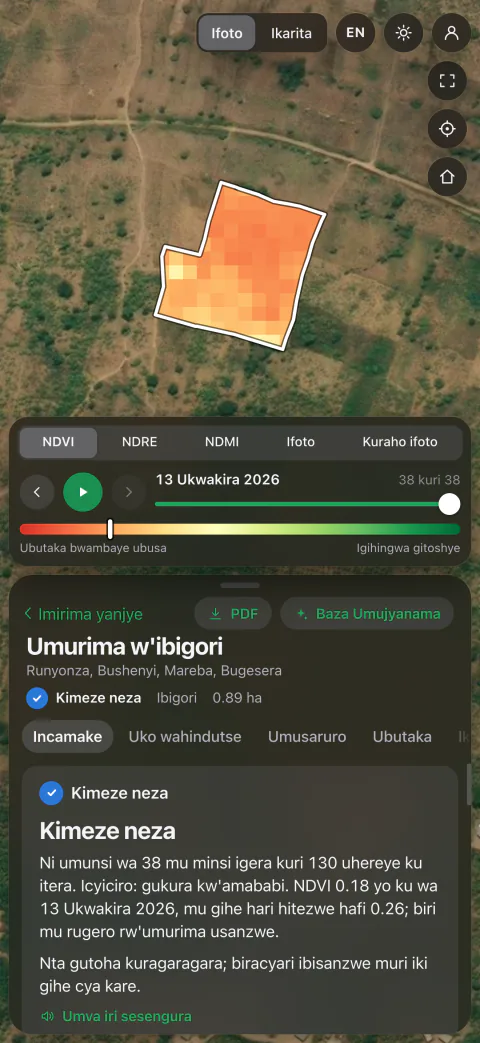
- See how the crop is doing against what it should be at this stage, with a colour map of the field
- Get an expected yield for your field, set against Rwanda's average and what the variety can reach
- Read the soil and slope for your crop, this week's weather advice, and the water the crop needs against the rain forecast
- Photograph a sick plant and learn what it is and which treatments are available in Rwanda
- Ask Baza Umujyanama anything by typing or speaking, and hear the answer read aloud
- Find out which crops suit a piece of land before putting money into it
How do you install Umujyanama on an iPhone?
- Open the App Store on your iPhone and search for "Umujyanama Hekitari", or tap the App Store button on this page
- Tap Get. There is nothing to pay
- Open the app. It starts in Kinyarwanda; tap EN at the top right for English
- Find your land on the first screen, then say what is growing on it and when it was planted
- Read the analysis. To keep the field, open a free account with your name, a phone number or email, and your district
The app asks permission before it uses the camera, the microphone or your location, and uses each only when you press the button that needs it: the camera for a disease check, the microphone for a spoken question, and your location to show the field you are standing in. Your location stays on the phone.
Is Umujyanama on Android?
It is not on Google Play yet, but Android farmers can use it today. Open umujyanama.hekitari.com in Chrome and choose Add to Home screen. It installs with its own icon, runs full screen, and has the same features as the iPhone app. Once it has been opened with a connection, it opens again without one.
Does the iPhone app work without internet?
Partly. The App Store version needs a connection to open. Once it is open, a field you draw, a plant you photograph or a question you type is kept on the phone and sent when the network returns. If you often farm out of coverage, open umujyanama.hekitari.com in Safari and choose Add to Home Screen, which gives an iPhone the version that also opens with no connection.
Should you use Umujyanama or Smart Farm Manager?
Use Umujyanama if you are a farmer who wants advice on your own fields today: you open your own account, it costs nothing, and you can follow up to 25 fields. Choose Smart Farm Manager if you run a commercial farm or a cooperative and need digital farm records, harvest planning and role-based access across member farms. Hekitari's team sets that up around your operation.
Frequently asked questions
Is Umujyanama really free on iPhone?
Yes. It is free to download and free to use, with no advertising. Because it is a public service, an account can follow up to 25 fields and questions, photos and land studies have fair-use limits.
Who makes Umujyanama?
Hekitari, an agritech company based in Kigali, Rwanda. Its App Store title is "Umujyanama – Hekitari", and the service also runs at umujyanama.hekitari.com.
Can I use Umujyanama in English?
Yes. The app opens in Kinyarwanda, and the EN button at the top right switches the whole app to English, including the adviser's written and spoken answers. RW switches it back, and the phone remembers your choice.
Who can see my fields?
Other users cannot; each account sees only its own fields. The outline, crop and analysis of a saved field are added, with your name and username, to a farm map held by Esri Rwanda for national crop monitoring. You can delete your account in the app at any time from the account menu.
Related guide
Farm Management Software for Rwanda & East Africa →